My Oceania
Creating your account and completing your Guest Registration Form, one easy step at a time.
Getting Started
My Account is Oceania Cruises' private website for guests who have booked a cruise. Inside it, in the section called My Oceania, you can see your booked cruises and take care of the paperwork for your sailing.
The most important paperwork is the Guest Registration Form. Oceania uses it to finalize your reservation and prepare your cruise documents and any flight arrangements. Without it, you cannot receive your cruise documents or complete the check-in process.
The deadline: your final payment date
Oceania asks that your Guest Registration Form be completed no later than your final payment date. It takes only a few minutes, and Oceania encourages you to complete it as soon as possible, so there is no need to wait until the deadline.
Have these ready before you begin
- The email address and phone number on your reservation. Your account is matched to your booking with these.
- Your passport, and the passport of each person traveling with you.
- An emergency contact: name and phone number of someone not traveling with you.
Creating Your Account
In your web browser, go to www.oceaniacruises.com/register. You will see the My Account Registration page pictured below.
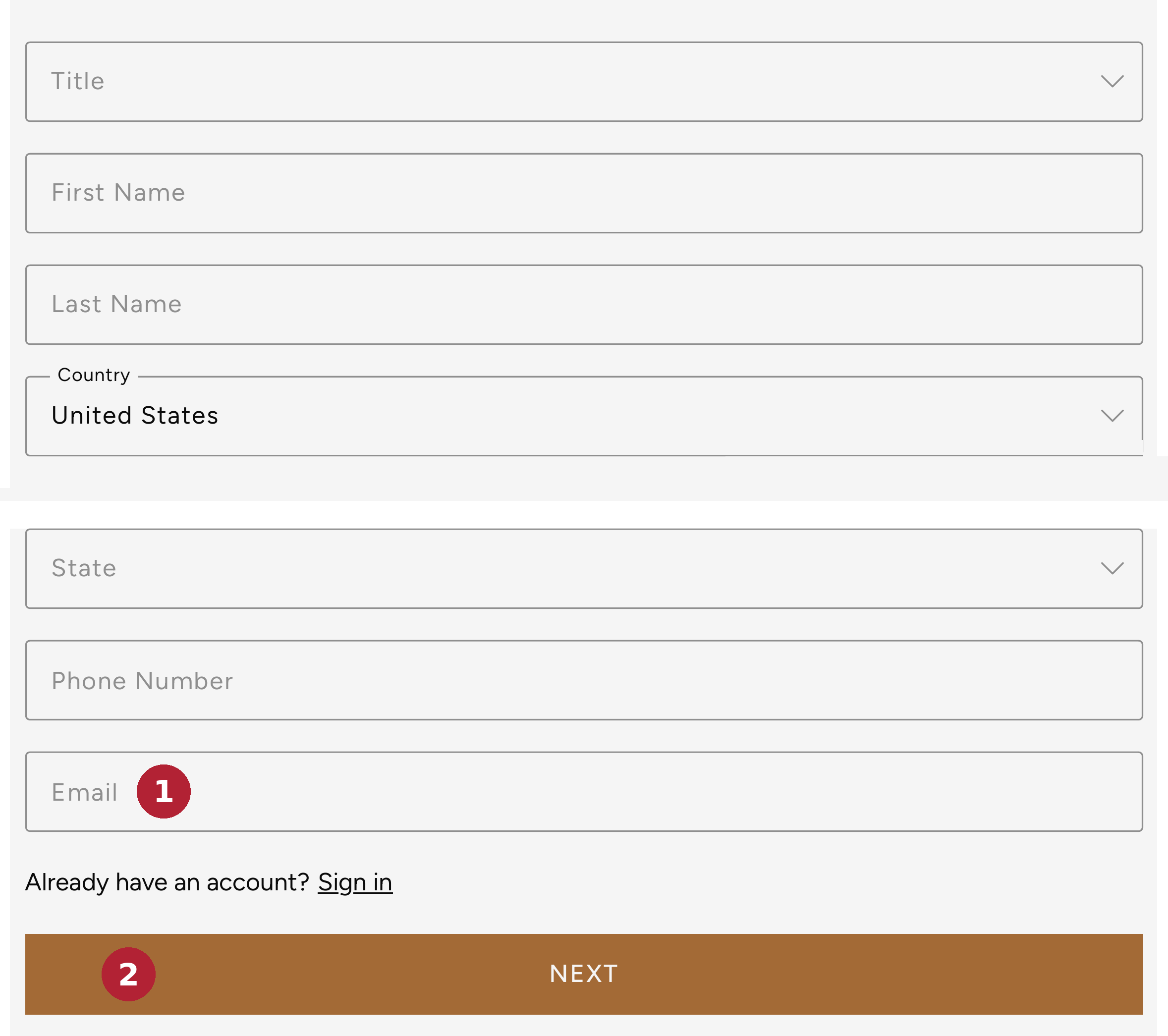
Fill in your Title, First Name, Last Name, Country, State, and Phone Number.
Type your Email in the box marked Email (marked 1). Use the email address that is on your reservation.
Tap Next (marked 2), and follow the remaining prompts to finish creating your account. Write your password down somewhere safe.
That is it, your account is created. From now on, sign in with your email and password, as shown in the next section.
If you already have a reservation
The registration page asks for the phone number and email associated with your reservation. If Oceania needs to check them, it asks you to call 1-855-OCEANIA to validate your current email address and phone number.
Already have an account? You do not need a new one. Look for "Already have an account? Sign in" on the registration page, just above the gold button. On a phone or tablet, the top of Oceania's website has no sign-in button. Open your browser and go straight to www.oceaniacruises.com/login; from there, everything works the same way.
Signing In and Finding Your Cruise
Go to www.oceaniacruises.com/login (the gold button above takes you there). You will see the Sign In to My Account page pictured below.
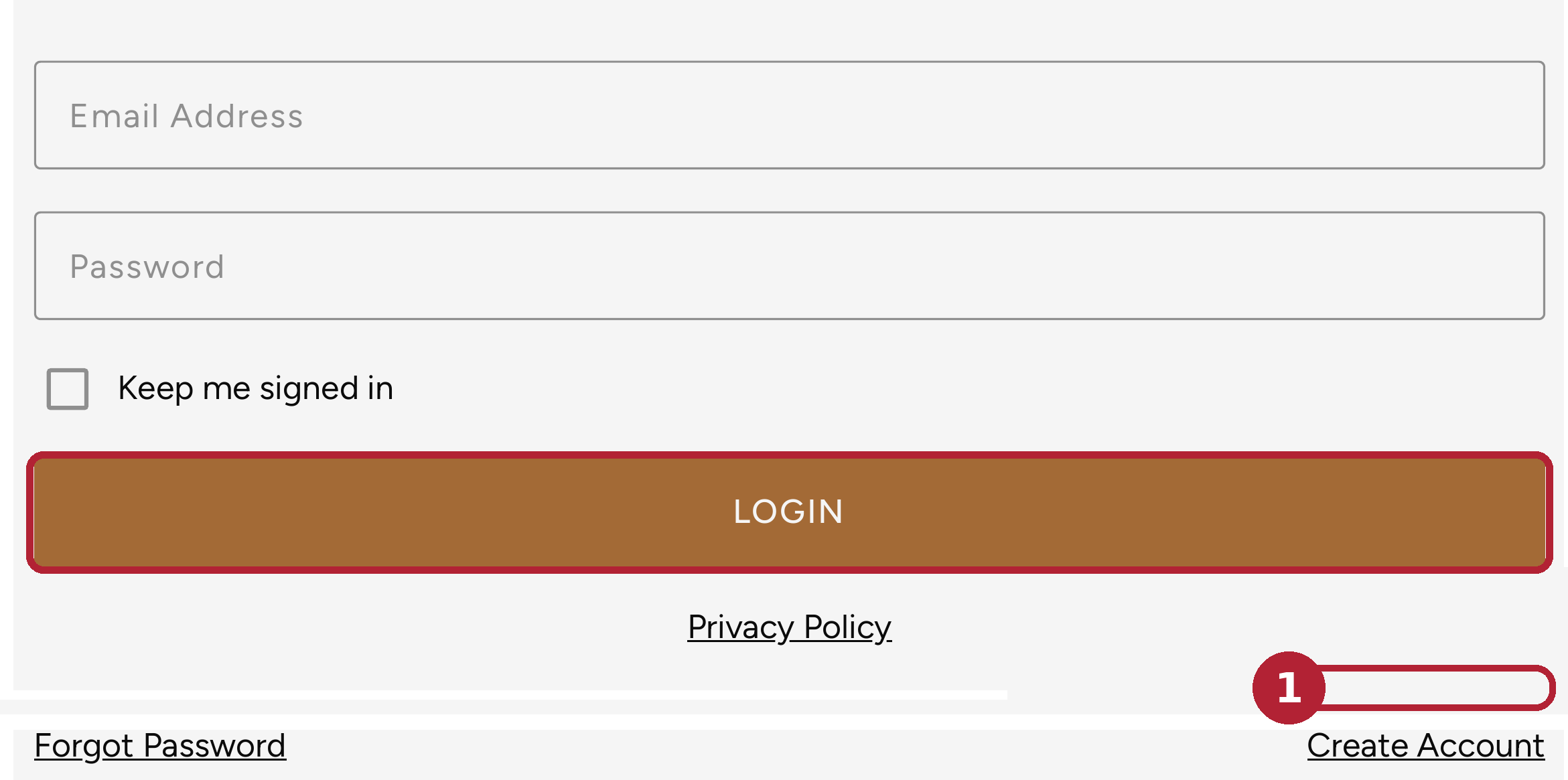
Type your Email Address and Password, then tap Login (outlined in red). On your own computer, you can tick Keep me signed in so you do not have to type your password every time.
Inside your account, click My Oceania, on the left side of the page.
You will see your booked and future cruises. Select your cruise. That takes you to the Booked Cruise section of your account, where your Guest Registration Form is waiting.
No account yet? Tap Create Account (marked 1) and follow Section 2 of this guide. Forgotten your password? Tap Forgot Password, on the same line. Section 5 explains how resetting it works.
Completing the Guest Registration Form
This is the most important part of the guide. The pages inside your account show your own cruise, so they look a little different for everyone. Follow the steps below.
Sign in, select your cruise, and open the Guest Registration Form in the Booked Cruise section.
Fill in your information carefully. Some boxes are already filled in and marked "Data on file". Check every one of them: it is your responsibility to make sure all of the information is accurate.
The form asks for
- Your full name — first, middle, and last — exactly as it appears on your passport, plus your date of birth and citizenship.
- Your passport details: number, issue date, and expiration date. Your passport must be valid for 6 months after the day your voyage ends.
- Your home address and phone number.
- An emergency contact: name, phone number, and how they are related to you.
When your own form is complete, open your traveling companion's form and complete it too, with their passport and information.
Very important: one form for every guest
Each guest must complete their own Guest Registration Form, even if you share a stateroom. One guest's form does not cover the other. Before you finish, check that a form has been completed for every person on the booking.
How you know it worked: with your form complete and your final payment made, Oceania can process your final documents and any flight arrangements, and sends your Cruise Vacation Guide about 75 days before sailing.
Helpful Tips and Troubleshooting
Forgot your password?
On the sign-in page, tap Forgot Password. Type your Email Address and tap Submit. Oceania sends a reset email, which should arrive within a few minutes; open it and follow the instructions.
Your cruise does not appear
Your account's email address and phone number must match the ones on your reservation. If they do not, call Oceania at 1-855-OCEANIA so they can validate them, or ask your travel advisor to check the booking for you.
Looking for the button to continue?
On the registration page, the gold button at the bottom says Next. That is the button that takes you forward.
Something will not submit
A required answer is almost always missing. Scroll back slowly; the website marks the spot that needs attention.
You notice a mistake later
Call your travel advisor or Oceania right away. Name and passport errors are far easier to fix early than close to departure.
One last check: names must match passports
The names on your booking and your form — first, middle, and last — must be identical to those on your passport. Compare them side by side before you finish; a mismatch can cause real problems at the airport and at check-in.
And if you get stuck at any point, do not worry. That is what your travel advisor is for.
Screens shown are from www.oceaniacruises.com, verified November 2026; Oceania may update its website, so yours may differ slightly. This guide is not published by Oceania Cruises.